USB Ports – Are You Getting the Speed You Should?
Something that's easily overlooked on a computer is which USB port you're using.Many computers have a mixture of USB 2.0 and USB 3.x ports, and plugging an external drive into the wrong one can make quite a difference when transferring large files.
For example:
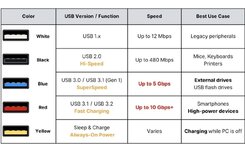
- USB 2.0 – Maximum theoretical speed of 480 Mbps.
- USB 3.0 – Maximum theoretical speed of 5 Gbps.
- USB 3.1/3.2 – Some versions support 10 Gbps or even 20 Gbps.
You can sometimes identify USB 3.x ports by their blue inserts, although colour isn't always a reliable guide.
It's also worth remembering that a USB 3.x drive connected through a USB 2.0 hub will generally be limited to USB 2.0 speeds.
If you're copying hundreds of gigabytes of photos, videos or music, that can mean quite a difference in waiting time!
Has anyone ever discovered they'd been using a slower USB port without realising it?
Or had problems with external drives running much slower than expected?