

MicroSD card flashing tool usd to flash images generated using Allwinner Technology's source code. The tool creates bootable microSD cards and NAND flashing microSD cards.
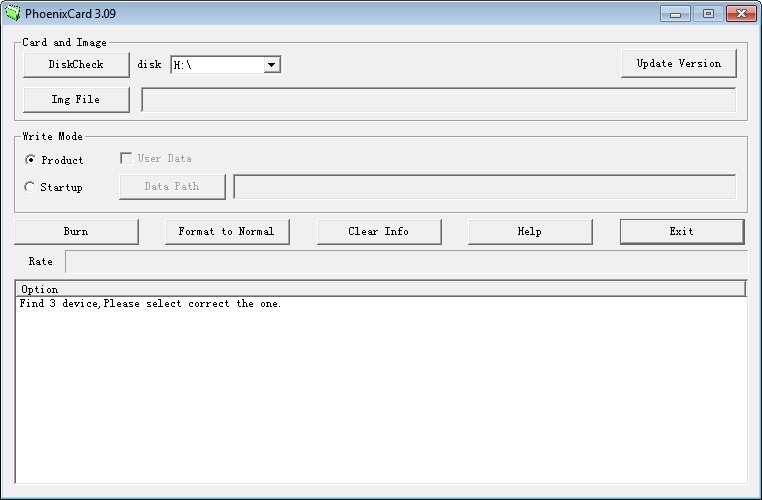
Instructions:
CAUTION!! This tool can reimage (erase) a drive if used incorrectly. Verify the drive being flashed and
as a precaution, remove any unnessecary USB drives prior to the burn process.
1 - Launch App and select the firmware to flash to the microSD card.
2 - Select the write mode, Product creates microSD card that flashes image to module NAND and Startup creates a bootable microSD card.
3 - Insert USB/MicroSD adapter and verify USB/MicroSD adapter matches the drive letter selected in PhoenixCard.
4 - Select burn once ready to create the MicroSD card.
Phoneonix card and Formatter downloads
Instructions:
CAUTION!! This tool can reimage (erase) a drive if used incorrectly. Verify the drive being flashed and
as a precaution, remove any unnessecary USB drives prior to the burn process.
1 - Launch App and select the firmware to flash to the microSD card.
2 - Select the write mode, Product creates microSD card that flashes image to module NAND and Startup creates a bootable microSD card.
3 - Insert USB/MicroSD adapter and verify USB/MicroSD adapter matches the drive letter selected in PhoenixCard.
4 - Select burn once ready to create the MicroSD card.
Phoneonix card and Formatter downloads

